
Battleship: The Board Game
Marmalade Game StudioBoard
3.6640.00 Reviews
- Version
- 1.4.0
- Installs
- 100.00K
- Age Rating
- Everyone
Screenshots

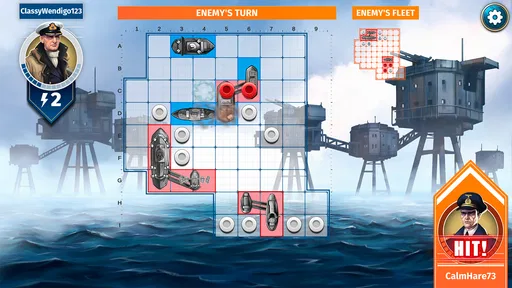
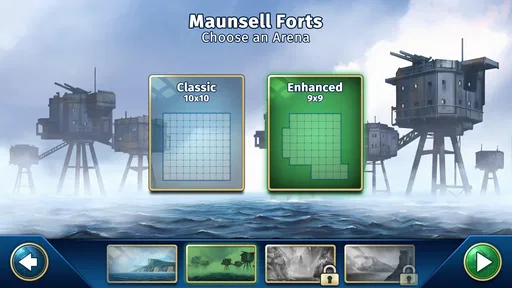
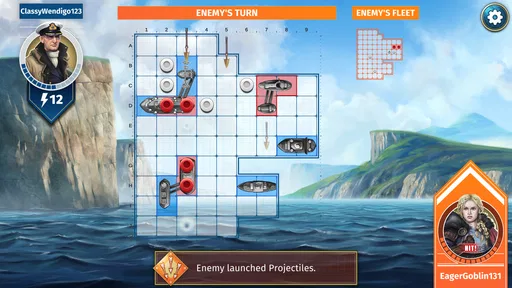
Our Review of Battleship: The Board Game
 Analysis by Appyee
When I decide whether a digital board game is worth keeping on my phone, I look for more than a familiar name. I want the rules to feel clear without a table full of pieces, turns to be easy to follow on a small screen, and the match to suit the time I actually have. Battleship: The Board Game is appealing when I want a focused contest built around reading a rival’s choices rather than learning a large set of rules. It costs $2.99 to buy, with optional in-app purchases ranging from $2.99 to $12.99 per item, so I’d think about the purchase as a paid game first, not as a free way to pass a minute.
What I want from a phone version
The familiar grid gives this naval board game an immediate advantage over many strategy games: I can understand the basic aim at a glance, then spend my attention on where to search and how to interpret each result. The simple format also works well when I’m sharing a phone or tablet with someone nearby. Instead of setting out a physical board and keeping track of pieces, I can get to the central decision quickly. That convenience is the main reason I’d choose a mobile version over the box on an ordinary evening.
That simplicity has a trade-off. Battleship is a game of uncertainty, and a run of unsuccessful guesses can feel slower than the dramatic moments when a hit narrows down a ship’s location. I enjoy it most when I’m in the mood to think through a pattern, not when I need constant action or a story to pull me along. Someone who mainly wants rapid reflexes, elaborate progression, or a broad campaign should look elsewhere in the board-game category.
Where the digital format helps
A practical strength is the reduced setup burden. I don’t have to arrange a fleet by hand, check that every piece is in place, or remember which squares have already been called. The grid makes the state of a match legible, and the visual response to a hit helps a new player connect an action with its result. For a family member who knows the tabletop game but hasn’t played in years, that can make a quick rematch easier to start than explaining the whole setup again.
I also find the format useful for short, informal challenges. If a friend is already playing, a match can become a small shared activity without anyone needing to bring a board along. Online opponents offer a different kind of test: their choices don’t come with the conversational clues you might notice across a table, so I have to focus on the board rather than guessing from someone’s expression. The best fit depends on whether I want a social game in the same room or a more self-contained contest.
Who is likely to enjoy it
I’d recommend it to people who already like Battleship, casual players looking for a familiar head-to-head game, and anyone introducing the rules to a younger relative. Its Everyone content rating makes it a natural title to consider for mixed-age play, though I’d still check that a child is comfortable with the device and any online interaction. The straightforward premise is a plus when players have different levels of experience: nobody needs to learn a complicated character roster or a long chain of special abilities before taking a turn.
I’d be more cautious if you dislike guessing games, have little patience for a match whose tension builds gradually, or want a digital board game with deep tactical variety from one session to the next. The underlying appeal is the hunt across a grid, so it can feel repetitive if that core loop doesn’t click for you. Before paying, I’d ask myself whether I enjoy making and revising a search pattern; if I do, the familiar rules are a strength, and if I don’t, a word game or a board game with more distinct choices may hold my attention better.
How it compares with other ways to play
Against a physical Battleship set, the mobile game is easier to carry and avoids the small practical chores of arranging and storing components. The tabletop version still has the edge when the point is to sit together, talk, and share a screen-free activity. Compared with free, simpler Battleship-style apps, this is a paid release from Marmalade Game Studio, which may suit someone who wants a more polished presentation of a familiar game, but the purchase makes it sensible to check whether the included ways to play match your habits before spending.
It also occupies a different place from heavier digital strategy titles. There’s no need for me to set aside a long session just to understand the premise, but players seeking layers of resource management or a campaign may find the design too focused. I see that as a clear choice rather than a flaw: this is for the compact pleasure of searching, making a plausible inference, and seeing whether it pays off. If that is the kind of decision-making I want, a smaller scope can be exactly what makes it easy to return to.
A useful way to approach a match
One small habit makes the guessing feel more deliberate: I try to treat each result as information, not just as a win or miss. After a hit, I look at neighboring squares before scattering guesses elsewhere, because a successful call changes what is reasonable to test next. A miss can be useful too, especially when I avoid repeating the same broad search without a reason. This doesn’t guarantee a win, but it gives the match a clearer rhythm and makes luck feel less like the only factor.
I also wouldn’t rush to make every opening choice in the same way. Varying where I begin keeps my own play from becoming automatic, while paying attention to which areas I’ve already checked helps me avoid wasting a turn. When playing someone I know, it can be tempting to assume they’ll place ships as I would; I try to treat that as a hypothesis, not a fact. The game is more satisfying when I update my plan as the board develops instead of sticking stubbornly to my first guess.
For a realistic everyday use, I can picture opening it while waiting for a family member at an appointment, then inviting them to play a quick match rather than scrolling separately. It also makes sense for a low-pressure break between tasks: the rules are familiar enough that the mental effort goes into the choices, not into learning a system. If I’m playing online, I’d reserve the chat for friendly encouragement and avoid treating a stranger’s silence or style as a personal challenge. That keeps the social part light and lets the board stay the focus.
The Classic Game Reimagined
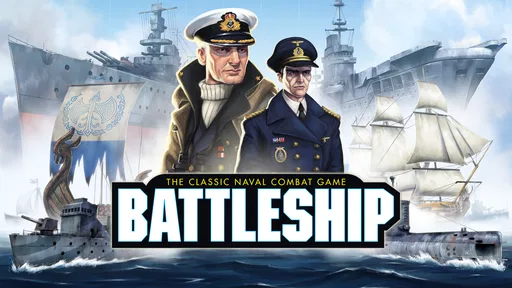
First off, let me just say how cool it is to have a classic like Battleship: The Board Game available on your phone. The app does a fantastic job of maintaining the original feel while adding some modern twists. The graphics are sleek and the interface is pretty user-friendly, so no need to worry about fumbling through a complicated setup.
Gameplay Experience
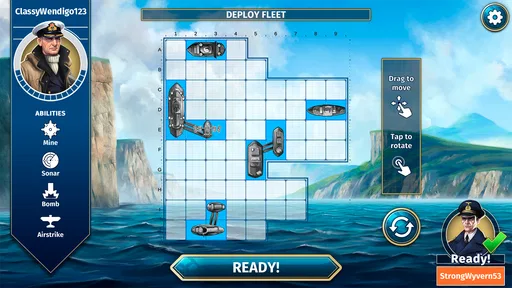
Jumping into a game is super easy. Whether you're a veteran or new to the game, you'll find the controls intuitive. You get to place your ships on a grid, just like the board game. The app even lets you rotate and position your fleet with a simple swipe, making it feel almost like you're physically placing them on the board.
Once the game starts, it’s all about strategy and a bit of luck. You tap on the grid to fire at your opponent’s ships, and when you hit one, it’s just as satisfying as you remember. There’s even a little explosion animation to keep things exciting!
Multiplayer and Solo Modes
One of the highlights of this app is the multiplayer mode. You can challenge friends or match up with random players online. It’s a great way to test your skills against different strategies. Plus, there’s a chat feature that lets you taunt your opponents—or congratulate them, depending on how sporting you’re feeling.
But if you’re more of a solo player, don’t worry. The app includes a single-player mode where you can battle against AI. Let me tell you, these bots are no pushovers! They offer a decent challenge, keeping the game interesting even when you’re playing alone.
Customization Galore
Now, if you’re someone who likes to personalize your gaming experience, you’ll love the customization options here. You can choose different themes for your board, ranging from classic naval settings to futuristic sci-fi looks. There are also various ship skins to unlock, giving your fleet a unique touch.
Sound and Visuals
The sound design in the app is spot on. From the background music that sets the naval atmosphere to the sound effects of torpedoes hitting their mark, it all adds to the immersive experience. The visuals are crisp, and the animations are smooth, making each game visually appealing.
Accessibility and Ease of Use
One of the things I really appreciated is how accessible the game is. It’s available on both Android and iOS, and the download size is pretty reasonable, so it won’t hog your device’s memory. The menus are straightforward, and there’s a handy tutorial for those who might need a refresher on the rules.
The app also supports multiple languages, which is a nice touch. It opens up the game to a wider audience and makes it easy to play with friends from different parts of the world.
Purchase and staying power
The price is worth weighing against how often I expect to play. A familiar game can be a reliable choice for a commute break or a quiet evening, but a one-time purchase is harder to justify if I only enjoy the first few matches. The optional purchases mean there may be extra spending to consider, so I’d decide on a budget before browsing them rather than assuming every customization is included with the initial cost. The game’s average rating is 3.6 from around 3,200 ratings, with about 640 written reviews; that suggests a mixed reception, so I’d use the fit of the core game—not popularity alone—as my guide.
For compatibility, the listed minimum is Android 6.0, and the current version is 1.4.0. It was released on May 3, 2018, and has more than 100,000 installs. Those details make it an established mobile release rather than a brand-new experiment, but I’d still check the store page on my own device before buying, especially if I’m using an older phone or tablet. The age rating is Everyone, which suits the uncomplicated naval theme, while online play is still something I’d supervise for younger players.
Choosing a mode for the moment
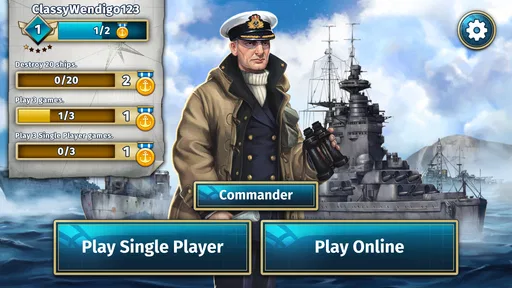
If I’m learning or just want to practise without coordinating with another person, the solo option is the easier starting point. It lets me get comfortable with placing ships and reading the grid at my own pace. I’d move to a friend or online match when I want the uncertainty of another person’s decisions. For a shared-device evening, I’d choose the friend challenge; for a quick session on my own, I’d choose the AI. That simple distinction helps avoid expecting a solo game to provide the same social energy as a real opponent.
There is also a practical difference between playing with a familiar opponent and meeting a random one. With a friend, the match can be part of a conversation and a little friendly rivalry. Online, I’d be prepared for the other player’s pace and approach to vary, and I wouldn’t start a match unless I can give it enough attention to finish comfortably. The chat can add personality, but anyone who prefers a quiet game can simply focus on the grid rather than treating conversation as essential.
What to check before committing
Since this isn’t a free download, I’d confirm that the mobile format is what I want: a digital grid, quick ship placement, and turns centered on locating a hidden fleet. If I’m buying it for a household, I’d also consider whether the people I hope to play with prefer screen-based games or would rather handle a physical board. The app saves setup effort, but it cannot replace the shared table experience for someone who values face-to-face play more than convenience.
I’d also keep the optional purchases in perspective. They are not a reason to avoid the game automatically, but they do make it worth deciding what I consider essential before spending further. If the basic match is already enjoyable, I can leave extras alone; if personalization is the main attraction, I should be comfortable with the possibility of additional costs. That distinction matters more here than chasing every available look for a fleet.
My recommendation
All in all, Battleship: The Board Game is a fantastic adaptation of the classic board game. It retains the charm of the original while enhancing the experience with modern features. Whether you’re looking to relive childhood memories or discover the game for the first time, this app is definitely worth a download.
So grab your device, set up your ships, and get ready to shout, "You sunk my battleship!"
Verdict
Strengths of Battleship: The Board Game
- Classic gameplay with modern graphics.
- Smooth and intuitive user interface.
- Multiplayer mode for real-time battles.
- Customizable game settings and themes.
- Offline mode available for solo play.
Limitations of Battleship: The Board Game
- Occasional connectivity issues in multiplayer.
- Limited free features without in-app purchases.
- Ads can interrupt gameplay experience.
- No tutorial for new players.
- Requires constant updates for bug fixes.
Other Releases by Marmalade Game Studio
View All


Similar Picks in This Category
View All
Ludo King®
Gametion4.1

Ludo
Yarsa Games4.6

Tile Master® - Matching Game
Higgs Studio3.6

Checkers Online
CC Games4.6

Dominoes
Loop Games4.7

Chess
Chess Prince4.6
Frequently Asked Questions
What is Battleship: The Board Game app about?
Battleship: The Board Game app is a digital version of the classic naval combat game where players strategically place ships on a grid and take turns guessing the location of their opponent's fleet. The app offers both single-player against AI and multiplayer modes, enhancing the traditional experience with modern features and graphics.
Is Battleship: The Board Game suitable for all ages?
Yes, Battleship: The Board Game is designed to be family-friendly and suitable for players of all ages. Its simple rules and easy-to-understand gameplay make it accessible for children, while strategic elements ensure that it remains engaging for adults as well.
Does the app offer any multiplayer options?
Yes, Battleship: The Board Game includes multiplayer options where you can challenge friends or other players online. The app supports both local multiplayer, where you can play with someone on the same device, and online multiplayer, allowing you to compete with players worldwide.
Are there any in-app purchases or ads in Battleship: The Board Game?
The app may include in-app purchases and ads, depending on the version you download. These purchases can offer additional features, customizations, or ad-free experiences. It's advisable to check the app's details on the store page to understand any potential costs and decide based on your preferences.
What devices are compatible with Battleship: The Board Game?
Battleship: The Board Game is available for both Android and iOS devices. It typically requires a minimum OS version, such as Android 5.0 or iOS 10.0, but it's best to check the app store for specific compatibility requirements to ensure it works smoothly on your device.
Play our best games!


